Every Signature Accounted For.
Every Workflow Under Control.
Stop chasing signers. Control workflows, track every action, and get documents signed from any device - no account needed.

Compliant

Recognized

Aligned

11 Ready
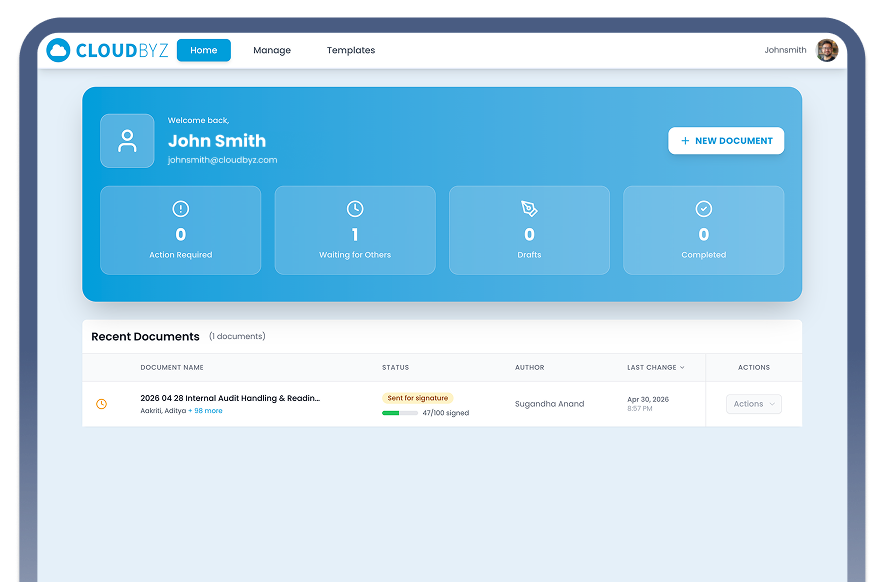
How a Document Moves Through Cloudbyz eSign
From Upload to Signed - Fully Tracked
Document Configured

Invitations Sent

Signatures In Progress

Audit Trail
Why Teams Switch to Cloudbyz eSign
Your current tool collects signatures. It doesn't run the workflow around them.
No Control Over Signing Order
Audit Trails That Stop at the Signature
Signers Who Need a Login
Starting Over for Every Agreement
Platform Capabilities
Built for the whole agreement - not just the signature.
 Signing Workflows
Set the order. Or don't. You decide.
Cloudbyz eSign gives you explicit control over how multi-party agreements are executed. Configure a strict sequential order so no one signs out of turn, or use parallel mode to collect signatures simultaneously. Either way, every recipient receives a personalized, direct signing link - no account creation required.



Signature
Draw, Type In A Styled Font, Or Upload An Image

Initials
Separate Initials Field, Independently Placed

Text
Free-Form Input The Signer Fills In At Signing Time
Pre-Filled Text
Locked Text Stamped By The Sender - Read-Only For Signers
 Audit Trail
A complete record of what happened - not just that it happened.
Cloudbyz eSign captures the full lifecycle of every document, from the moment it's created to the moment it's completed. Every event is written once, stored permanently, and never modified.

Audit Access:
View the full event timeline alongside the signed document in any document preview - Filter by user, event type, or date range in the Audit History dashboard - Export the complete audit log as a CSV for offline review or submission
 Document & Template Management

Build it once. Use it every time
Create templates with fields pre-placed and signing roles pre-assigned. When you need to send, fill in the actual recipient names and emails - the structure is already there.
Template Capabilities
Place all field types on the PDF and assign each to a named role (e.g., “Client,” “Legal,” “Approver”) - Set sequential or parallel signing order at the template level - Add comments or instructions that appear to signers at signing time - Use for one-off documents or repeat workflows
Document Management
Track all documents across statuses: Draft, Sent for Signature, Completed, Cancelled - Search, filter, and sort by status, date, or author - Preview any document alongside its full event history - Download the final signed PDF from any completed document - Resend a signing invitation to a specific recipient without resetting the whole workflow - Manually cancel an in-progress document when needed - Reassign documents between users at the admin level
 Organization & Access Management
Admin Controls For The Teams Who Need Them.
Cloudbyz eSign Supports Both Individual Users And Multi-Member Organizations With Shared Document Visibility And Centralized Admin Controls.
User Management (Admin)
Activate Or Deactivate Team Members - Assign Or Remove Admin Roles - Reassign All Documents Owned By A Departing User To Another Member - No Documents Are Orphaned
Credit System
Credits Are Consumed When A Document Is Sent For Signature - Organizations Share A Credit Pool Across All Members - Individual (Personal) Accounts Have Their Own Credit Balance - Admins Can View Current Balance, Usage History, And Refill Credits

Analytics
Event Volume Trends Over Time (24h, 7d, 30d, 90d) - Activity Breakdown By Event Type - Peak Usage By Hour And Day Of Week - Top Active Users Within The Organization
How It Works
From upload to signed - four clear steps.

Upload

Configure

Send

Sign & Audit